3. Sign-in and tokens
People sign in once with the oh CLI. It keeps their gateway token fresh from then on.
An agent gets in a different way and needs none of this. If you are setting up a headless service, go straight to Agent access.
Before anyone can sign in
An account admin connects your identity provider once, on the OIDC tab of Account Settings → Identity. See OIDC Federation for every field.
Who may sign in is then decided by your identity provider.
Sign in with the oh CLI
This is the recommended way. You sign in once, and the CLI renews your token for every session. Nothing is pasted.
oh ai-gateway login --gateway-url https://ai-gateway-<id>.dp.onehouse.ai
Your browser opens so you can sign in with your identity provider. After you sign in, the CLI prints the one-time MCP setup for Claude Code and Codex. Then start your client through it:
oh ai-gateway run -- claude
oh ai-gateway run -- codex -m <alias>
- Set the gateway once in your
ohprofile (AI Gateway URL inoh-configure) and you can drop--gateway-url. - The CLI keeps your sign-in in your OS keychain. Access tokens stay in memory and are never written to disk.
- On a machine with no browser, use
--no-browserto print the sign-in link, or--port <n>to pin the callback port for an SSH forward. oh ai-gateway logoutends the sign-in. Tokens already issued stay valid until they expire, up to 7 days. To cut a person off at once, revoke their access.
See oh ai-gateway for every command and option, and Connect your client for each client.
oh ai-gateway login signs you in to the gateway in your data plane. oh login signs you in to the Onehouse API. Neither one signs you in to the other.
Or get a token from the token page
For a client the CLI does not cover, or a quick curl:
- Open AI Gateway. On the Overview, under Call the gateway, choose Get my token. The gateway's own sign-in page opens in a new tab.
- Choose Sign in with SSO, and sign in with your identity provider.
- Copy the token and the base URL from the token page.
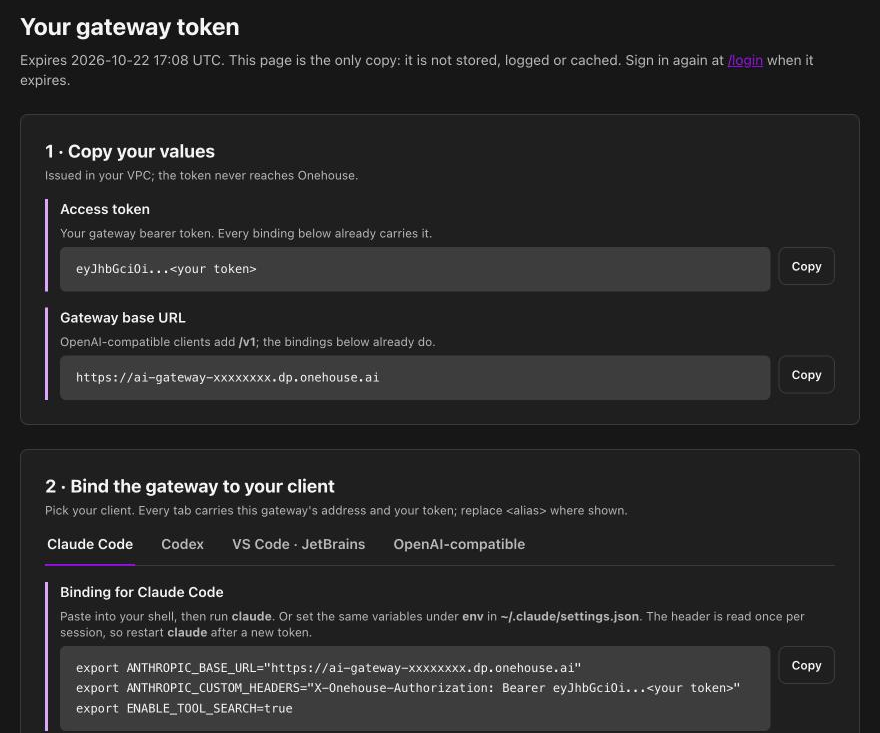
The same page then shows a setup for each client, with your token and address already filled in. A token pasted into a client does not renew. When it expires, sign in again and restart the client.
The sign-in page and the CLI both reach the gateway inside your own network. You need to be on your VPN or inside your network.
How long tokens last
| Who | Token lasts | Renewal |
|---|---|---|
| A person | 7 days | oh ai-gateway run and the MCP helper renew it for you. A pasted token needs a new sign-in. |
| A service principal | 5 minutes | The agent mints a new one. See Agent access. |
If sign-in is refused
The sign-in turns you away when your workspace domain or group is not permitted to use this gateway. Ask an account admin. It is decided by your identity provider, not by anything you can change.
Cut off a person's access
An admin can refuse every token a person holds. See Revoke a person's access.