OIDC Federation
OIDC Federation connects your identity provider (IdP) to the services that run inside your own data plane, so the people and agents reaching them sign in under your rules.
It is configured on the OIDC tab of Account Settings → Identity. The tab holds the provider form only — switching the identity service on per project is the separate Dataplane IDP tab.
OIDC Federation does not change how anyone signs in to the Onehouse console — that is Single Sign-On and is configured separately. This page governs access to services running in your data plane, nothing else.
Today this governs the AI Gateway.
Two parts
| Part | Scope | Required? |
|---|---|---|
| Identity provider | Your account | Only when people will sign in. An agent authenticates against the identity service directly and needs no provider of yours. |
| Dataplane IdP | Each project | Yes, always. The identity service inside that project's data plane. Nothing there can authenticate until it is running. |
The provider is configured once. Opting in happens per project, because the identity service runs per data plane — each project has its own callback address.
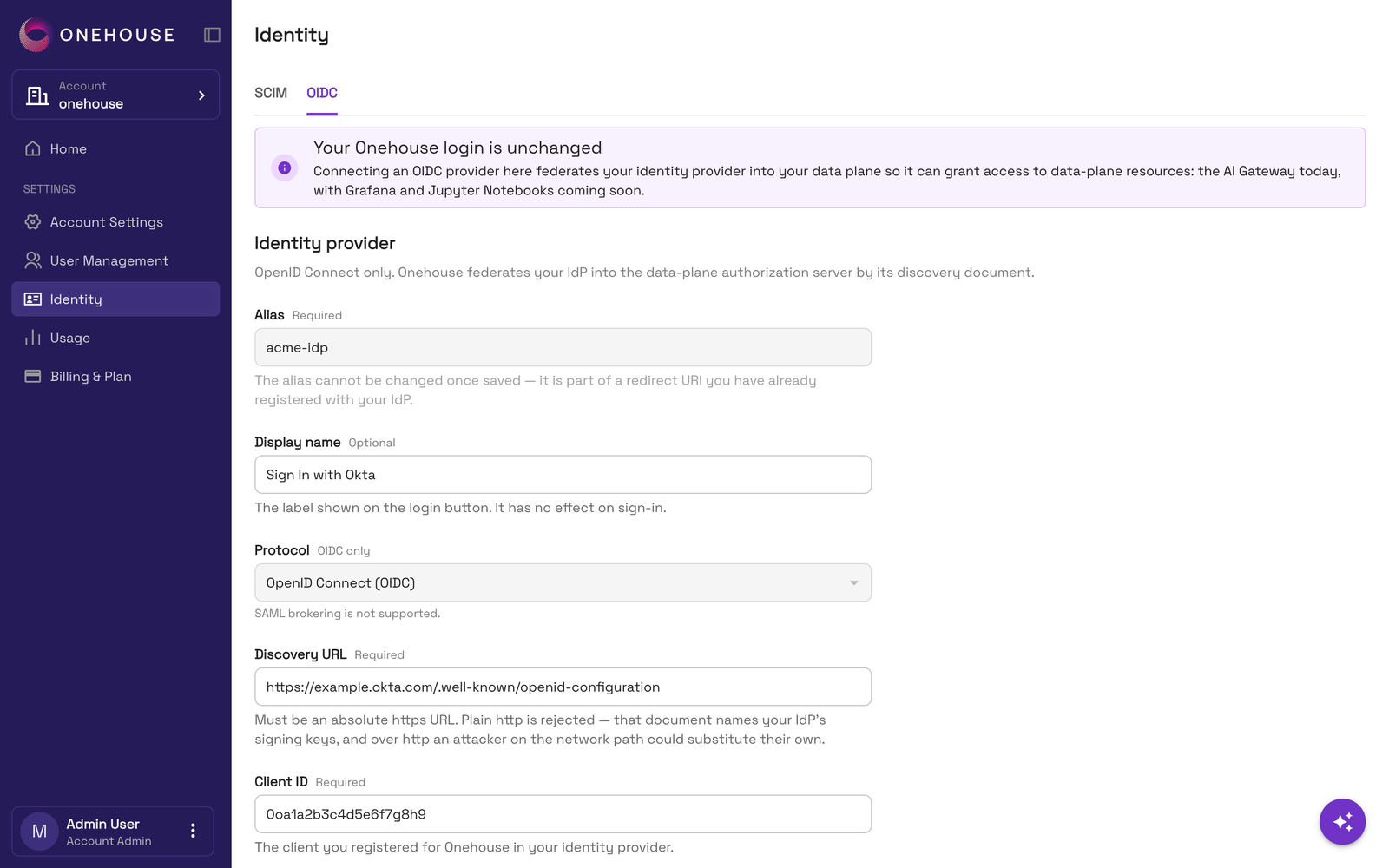
Identity provider fields
| Field | What to put in it | |
|---|---|---|
| Alias | required | A short name: 1–40 lowercase letters, numbers or hyphens, starting and ending with a letter or number. It becomes part of the login-redirect address you register with your IdP, so it cannot be changed after you save. |
| Display name | optional | What your people see on the sign-in button. |
| Protocol | fixed | OIDC. Nothing to choose. |
| Discovery URL | required | Your IdP's .../.well-known/openid-configuration address. |
| Client ID | required | The client you registered for Onehouse in your IdP. |
| Client secret | required when creating | That client's secret. Once saved it is never shown back — to change it later, switch on Replace secret and enter a new one. |
httpsPlain http is rejected. That document names your IdP's signing keys, and over http someone on the network path could substitute their own.
Test the connection
Test connection fetches your discovery document, checks the issuer, verifies your client ID and secret against the token endpoint, and fetches your signing keys.
Run it before saving. A typo here shows up as a failed login later, not as a failed save. On an existing provider, leave Replace secret off to test the secret already stored.
Callback addresses
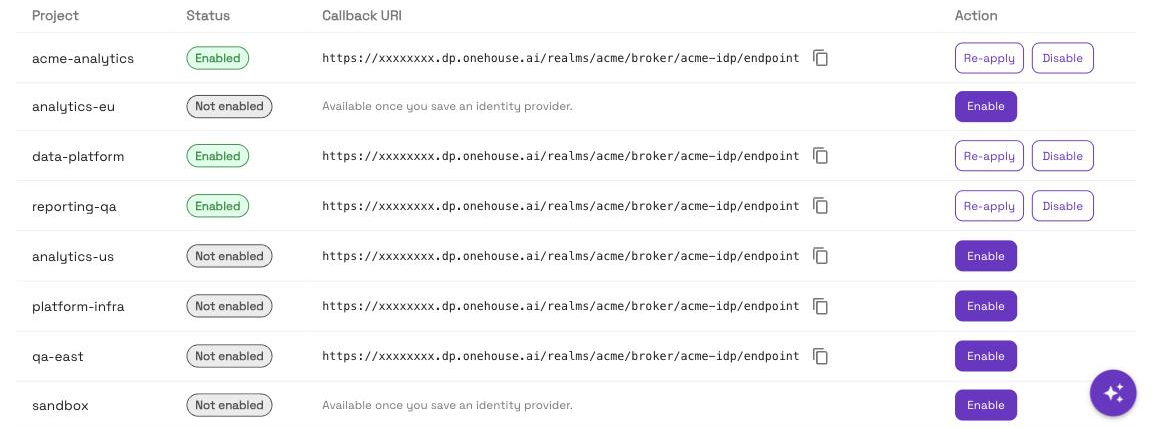
After signing someone in, your identity provider sends them back to a fixed address. Providers only allow addresses you have registered in advance, so each project's address has to be added to your provider before that project is enabled.
Each project has its own, listed beside it in the Project deployments table on the Dataplane IDP tab.
Add it to your identity provider
- Copy the address for the project from the Project deployments table, on the Dataplane IDP tab.
- Open the client you registered for Onehouse in your identity provider — the same one whose client ID and secret you enter above.
- Add the address to that client's list of allowed redirect addresses. Providers name this field differently: Authorized redirect URI, Sign-in redirect URI, Redirect URI, Valid redirect URI. They all mean the same field.
- Save in your provider, then come back and enable the project.
Repeat for every project you intend to enable. The addresses do not overlap, and one project's does not cover another.
The address must match character for character — no added or removed trailing slash, no change of case. A provider that does not find an exact match refuses the sign-in.
A callback address cannot be changed once tokens have been issued against it. Register them all with your provider first, then enable.
If a project's row shows a message instead of an address, there is nothing to register for it yet.
Enabling it per project
A saved provider does nothing on its own. Each project must also have its identity service switched on, from the Project deployments table on the Dataplane IDP tab.
→ Dataplane IdP covers what that service is, how to enable it, and what each status means.
A project's identity service must be running before anything in that data plane can authenticate — even when you have saved no identity provider.
Who can change this
Configuring OIDC Federation is an account-admin action. Other account members can see the tab but cannot save a provider or test a connection.
Related
- Dataplane IdP — switching the identity service on per project
- AI Gateway — Identity setup — what to do here before turning the gateway on
- SCIM Identity Sync — provisioning users and groups from your IdP
- Single Sign-On — signing in to the Onehouse console