Codex
Start Codex through the oh CLI. Add the gateway's tools once.
Start it through the gateway
Sign in once with oh ai-gateway login — see Sign-in and tokens. Then, every session:
oh ai-gateway run -- codex -m <alias>
run points Codex at a local proxy that adds a fresh gateway token to every request. It passes the provider settings to Codex for that run only and leaves ~/.codex/config.toml alone.
Codex sends every turn to /v1/responses, which the gateway passes to the provider as is. An alias served by Anthropic answers 404. An old OpenAI model such as gpt-4 fails too: it rejects a tool Codex sends, and its context is too small. gpt-5 works.
Add the gateway's tools
Do this once, with Codex 0.148.0 or later. oh ai-gateway login prints this block with your address filled in. Add it to ~/.codex/config.toml:
[mcp_servers.oh-ai-gateway]
url = "https://ai-gateway-<id>.dp.onehouse.ai/mcp"
http_headers_helper = "oh ai-gateway token --format mcp-headers --gateway-url https://ai-gateway-<id>.dp.onehouse.ai"
Codex runs the helper on every connection and again after a 401, so the token stays fresh.
It passes only a short list of environment variables, so ONEHOUSE_* variables you exported are not seen. Use the block oh ai-gateway login prints: it carries your profile and credentials file itself. A service principal's key and secret belong in the oh profile, not in ONEHOUSE_API_KEY and ONEHOUSE_API_SECRET.
To reach the Onehouse MCP server's tools, there is a one-time sign-in. See Onehouse MCP server.
Without the oh CLI
Copy the values from the Codex tab of the gateway's token page — see Sign-in and tokens.
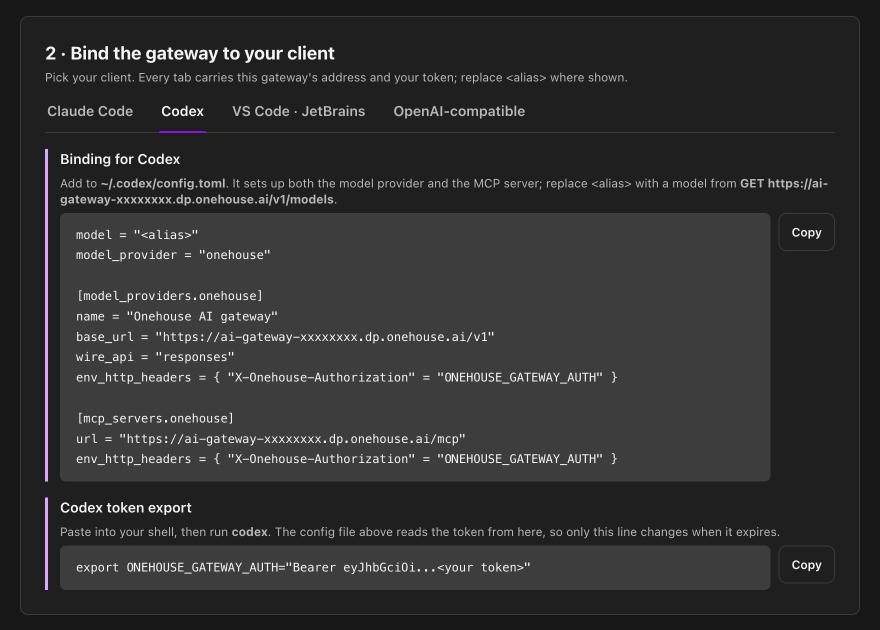
Codex has no base-URL environment variable — everything lives in its config file:
model = "<alias>"
model_provider = "onehouse"

[model_providers.onehouse]
name = "Onehouse AI gateway"
base_url = "https://ai-gateway-<id>.dp.onehouse.ai/v1"
wire_api = "responses"
env_http_headers = { "X-Onehouse-Authorization" = "ONEHOUSE_GATEWAY_AUTH" }

[mcp_servers.onehouse]
url = "https://ai-gateway-<id>.dp.onehouse.ai/mcp"
env_http_headers = { "X-Onehouse-Authorization" = "ONEHOUSE_GATEWAY_AUTH" }
Then export your token and run codex:
export ONEHOUSE_GATEWAY_AUTH="Bearer <token>"
The variable holds the whole header value, Bearer included — Codex copies it across verbatim. The config and the variable are read at startup, so when the token expires, export a fresh one and restart codex.
Use one MCP entry or the other, not both: the CLI's entry is named oh-ai-gateway, the token page's onehouse.
Line by line
| Line | Why |
|---|---|
model | A model name you published on the gateway. List them with GET /v1/models. |
base_url | Ends in /v1. Codex appends the rest of the path itself. |
wire_api = "responses" | The only value Codex still accepts. |
env_http_headers | Carries your token in the gateway's header. |
[mcp_servers.onehouse] url | Ends in /mcp, not /v1/mcp. |
env_key unsetenv_key makes Codex send a second, standard Authorization header. With the gateway's own header already present, the gateway reads that second one as your provider key and passes it upstream — your gateway token is no longer what reaches the provider. With no env_key, Codex sends no Authorization at all, which is what you want.