Claude Code
Start Claude Code through the oh CLI. Add the gateway's tools once.
Start it through the gateway
Sign in once with oh ai-gateway login — see Sign-in and tokens. Then, every session:
oh ai-gateway run -- claude
run sets everything Claude Code needs for that session: the base URL of a local proxy, the header that proxy expects, and ENABLE_TOOL_SEARCH=true. The proxy adds a fresh gateway token to every request, so a long session never hits an expired token. Anything you pass after claude goes to Claude Code unchanged.
Either one replaces your Claude subscription. The gateway then forwards that key to the provider as your own credential, so calls bill to it instead of to your plan. oh ai-gateway run warns you if ANTHROPIC_API_KEY is set. Do not use ANTHROPIC_AUTH_TOKEN for the gateway token either: Claude Code sends it as Authorization, and the gateway refuses a token there.
Add the gateway's tools
Do this once. oh ai-gateway login prints this line with your address filled in:
claude mcp add-json --scope user oh-ai-gateway \
  '{"type":"http","url":"https://ai-gateway-<id>.dp.onehouse.ai/mcp","headersHelper":"oh ai-gateway token --format mcp-headers --gateway-url https://ai-gateway-<id>.dp.onehouse.ai"}'
Claude Code runs the helper on every connection and again after a 401, so the token stays fresh. Which tools actually answer is decided by the grants on them, not by this command.
- Use
--scope user. A project or local-scope helper does not run until you accept the folder trust prompt. - If you used a profile (
oh --profile <name> ai-gateway login), the printed line carries it. Keep it.
To reach the Onehouse MCP server's tools, there is a one-time sign-in. See Onehouse MCP server.
Turn tool search on
Claude Code turns tool search off by default whenever the base URL is not Anthropic's own. Nothing warns you. Every tool's full schema is then sent on every request, and a session with a large tool catalog can burn several times more context before you have typed anything. It is safe to force on: the gateway passes tool blocks through untouched in both directions.
oh ai-gateway run sets ENABLE_TOOL_SEARCH=true for you. If you set things up by hand, set it yourself. auto and auto:N also work and let Claude Code decide, but true is the setting that has been measured through the gateway.
Checking it worked
Start a session and look at the context percentage after your first prompt. With a large tool catalog, a few percent means tool search is on; a third or more means it is not.
Without the oh CLI
Copy the values from the Claude Code tab of the gateway's token page — see Sign-in and tokens.
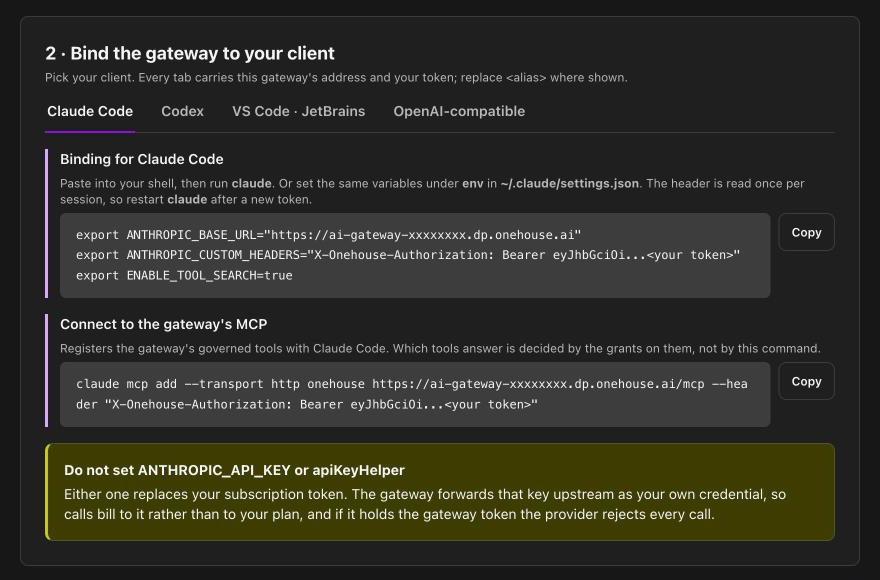
export ANTHROPIC_BASE_URL="https://ai-gateway-<id>.dp.onehouse.ai"
export ANTHROPIC_CUSTOM_HEADERS="X-Onehouse-Authorization: Bearer <token>"
export ENABLE_TOOL_SEARCH=true

claude mcp add --transport http onehouse https://ai-gateway-<id>.dp.onehouse.ai/mcp \
  --header "X-Onehouse-Authorization: Bearer <token>"
No /v1 on the base URL — Claude Code adds it. The header is read once per session, so restart claude after you get a new token, and update the MCP entry too.
Use one MCP entry or the other, not both: the CLI's entry is named oh-ai-gateway, the token page's onehouse.
Requirements
- Claude Sonnet 4 or newer, Opus 4 or newer, or Haiku 4.5 or newer. Older models cannot do tool search, and Claude Code says so and falls back on its own.