Hive Metastore
Description
Hive Metastore (HMS) is a central repository for storing metadata about the structure and location of data in Apache Hive, a data warehouse system built on top of Hadoop. The metastore allows users to store and manage table schema, partition information, and other metadata, supporting data processing and querying with several processing engines.
Cloud Provider Support
- AWS: ✅ Supported
- GCP: ✅ Supported
- Azure: ✅ Supported
Setup guide
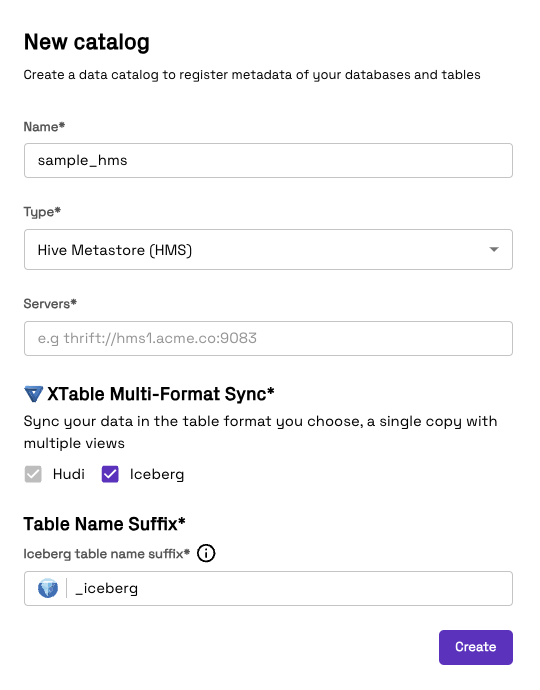
- Enter a Name to identify the data catalog in Onehouse
- Select Hive Metastore as the Type
- Enter the Servers
Multi-format Catalog Sync
Onehouse natively supports syncing to Hive Metastore in multiple open table formats.
Tables are always synced in the Apache Hudi format by default. You may additionally sync tables as Apache Iceberg using Apache XTable. This means that a single copy of your data will now be synced to Hive Metastore in both the Apache Hudi and Apache Iceberg formats, enabling you to use the best format for your use-case.
In order to set this up, select the formats that you would like to sync as and define the format suffix for the table name (Iceberg format will default to _iceberg). Thus any Iceberg format tables will be registered as tableName_iceberg in Hive Metastore. An example of this can be found in the table below.
| Format | Table Name (in catalog) |
|---|---|
| Apache Hudi (default) | tableName_ro (read optimized view) tableName_rt (real time or snapshot view) |
| Apache Iceberg | tableName_iceberg |
Onehouse managed Iceberg tables should not be written to via external writers - this could corrupt the data in the table. However, if you are using external Hudi writers, you can add the relevant configs as explained here to enable multi-writer mode from the external writers.
Example input for multi-format catalog sync