Permissions
Permissions can be enforced on resources and data in Onehouse with roles and privileges.
Onehouse Resources and Data Objects
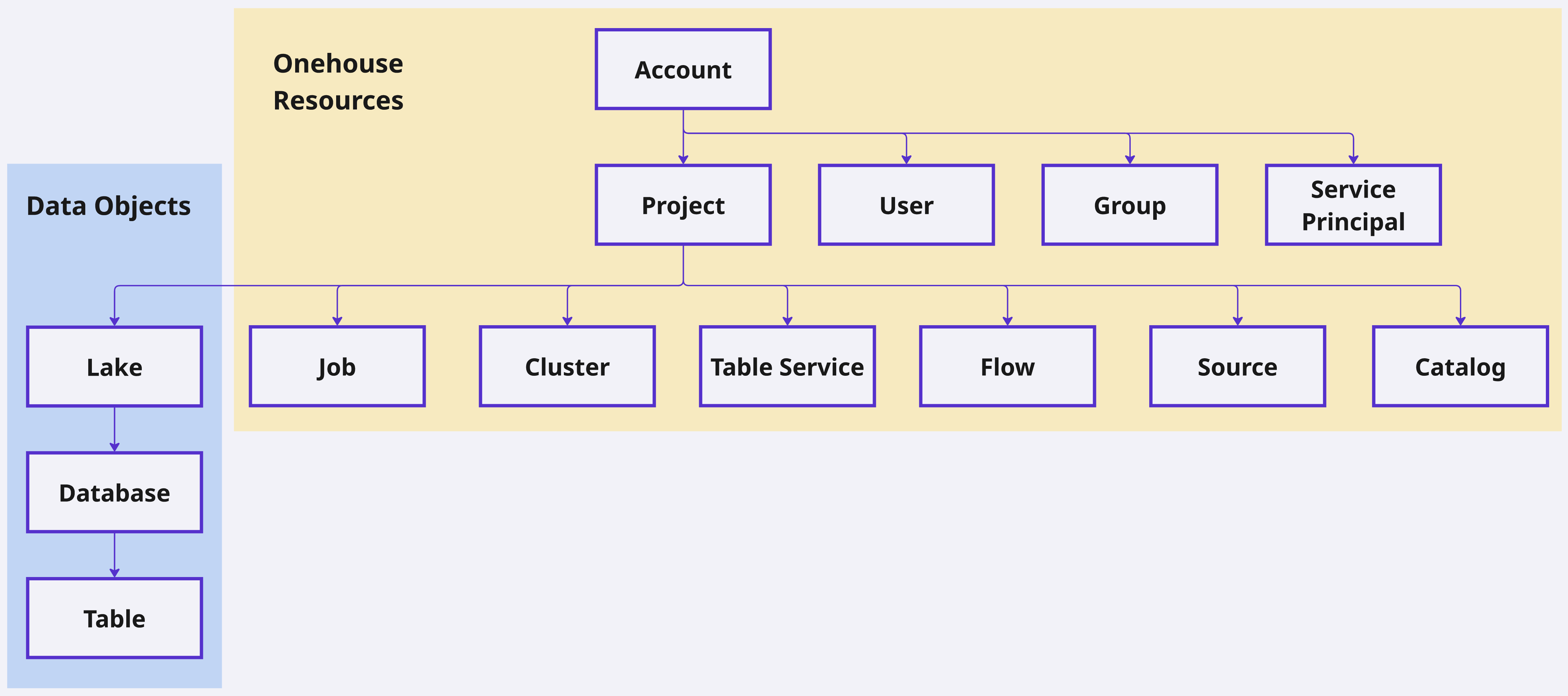
Permissions can be set on the following entities:
| Entity | Description | Permission Type | Examples |
|---|---|---|---|
| Onehouse Resources | Logical Onehouse entities in your account or project. | Roles | Account, Projects, Users, Groups, Service Principals, Jobs, Clusters, Table Services, Flows, Sources, and Catalogs |
| Data Objects | Your data stored and/or managed by Onehouse. | Privileges | Lakes, Databases, and Tables |
What permissions are required to create entities?
A user must meet the following prerequisites to create resources and objects in Onehouse:
| Entity | Prequisites for creation |
|---|---|
| Account | No account exists for the email domain |
| Project | Account Admin role |
| Group | Account Admin role |
| Service Principal | Account Admin role |
| User | Project Admin role |
| Flow |
|
| Cluster | Project Admin role |
| Table Service | Data privileges on the table (see below) |
| Job | Cluster User role on the Cluster |
| Catalog | N/A (anyone in project can create) |
| Source | N/A (anyone in project can create) |
| Lake | Project Admin or Account Admin role, or Data Admin |
| Database | Create Database privilege on the Lake, or Data Admin |
| Table | Create Table privilege on the Database, or Data Admin |
Project membership vs. resource access
Being a member of a project is not the same as having access to the resources inside it. When a project admin invites a user (or service principal) to a project, the user joins the project but sees no Flows, Jobs, Lakes, or Clusters until they are explicitly granted a role on each.
The typical sequence is:
- Project admin invites the user to the project (Settings → Users & Access).
- User joins — they are now a project member but no resources are visible.
- Project admin grants resource-level roles (e.g.,
Cluster Useron a Cluster, data privileges on a Lake/Database/Table). - User can now see and use the resources they have roles on.
If a newly invited user reports "I don't see anything in the project," they have completed step 2 but not step 3. The roles and privileges available for each resource type are described in the sections below.
Roles for Onehouse Resources
Account
The following roles can be granted on a Onehouse Account:
- Member - Basic Account access. Members can be granted additional permissions on specific Projects and Onehouse Resources.
- Reader - Includes all Member permissions, plus automatically granted read-only access:
- Ability to view all Account-level resources (Users, Service Principals, Groups)
- Admin - Full read/write access to the Account
| Ability | Member | Reader | Admin |
|---|---|---|---|
| Modify account & billing settings | X | ||
| Create projects | X | ||
| Create groups | X | ||
| Create service principals | X | ||
| Configure SCIM identity sync | X |
Project
The following roles can be granted on a Project:
- Member - Basic project access. Members can be granted additional permissions on specific resources.
- Reader - Includes all Member permissions, plus automatically granted read-only access:
Viewerrole on all Onehouse Resources (Clusters, Sources, Flows, etc.) in the ProjectDESCRIBEandSELECTprivileges on all Data Objects (Lakes, Databases, Tables) and Onehouse Resources (Catalogs, Sources, etc.) in the Project
- Admin - Full read/write access to the project and all its resources.
| Ability | Member | Reader | Admin |
|---|---|---|---|
| View/Use/Edit/Manage entities with granted permissions | X | X | X |
| Open the project | X | X | X |
| View project integrations | X | X | X |
| View project usage | X | X | X |
| Create Sources | X | X | X |
| Create Catalogs | X | X | X |
| Create Jobs | X (with required permissions) | X (with required permissions) | X |
| Create Table Services | X (with required permissions) | X (with required permissions) | X |
| Create Flows | X (with required permissions) | X (with required permissions) | X |
| Create users | X | ||
| Add users to the project | X | ||
| Edit user permissions in the project | X | ||
| Remove users | X | ||
| Connect a cloud account | X | ||
| Create Clusters | X | ||
| Create Lakes | X | ||
| Create and edit project integrations | X | ||
| Create and delete API tokens | X | ||
| Inherit all permissions for all entities in the project | X |
Group
The following roles can be granted on a Group:
- Member
- Manager
| Ability | Member | Manager |
|---|---|---|
| Create new groups | ||
| View metadata for group | X | X |
| Assign roles and privileges to group | X | |
| Remove roles and privileges from group | X | |
| Edit group members | X | |
| Edit group name | X | |
| Delete group | X |
Service Principal
The following roles can be granted on a Service Principal:
- User
- Manager
| Ability | User | Manager |
|---|---|---|
| Create new service principals | ||
| Assign roles and privileges to service principal | X | |
| Remove roles and privileges from service principal | X | |
| Edit service principal members | X | |
| Edit service principal name | X | |
| Delete service principal | X | |
| Create API tokens for the service principal | X |
Cluster
The following roles can be granted on a Cluster:
- Viewer
- User
- Editor
- Manager
| Ability | Viewer | User | Editor | Manager |
|---|---|---|---|---|
| View Cluster definition | X | X | X | X |
| Assign Flows / Jobs to Cluster | X | X | X | |
| View Cluster endpoint | X | X | X | |
| Edit Cluster definition | X | X | ||
| Modify permissions | X | |||
| Delete Cluster | X |
Source (coming soon)
The following roles can be granted on a Source:
- Viewer
- User
- Editor
- Manager
| Ability | Viewer | User | Editor | Manager |
|---|---|---|---|---|
| View source definition | X | X | X | X |
| Use source in a Flow | X | X | X | |
| Edit source definition | X | X | ||
| Modify permissions | X | |||
| Delete source | X |
Catalog (coming soon)
The following roles can be granted on a Catalog:
- Viewer
- User
- Editor
- Manager
| Ability | Viewer | User | Editor | Manager |
|---|---|---|---|---|
| View catalog definition | X | X | X | X |
| Use catalog in a Flow | X | X | X | |
| Use catalog in a MetaSync | X | X | X | |
| Edit catalog definition | X | X | ||
| Modify permissions | X | |||
| Delete source | X |
Job
The following roles can be granted on a Job:
- Viewer
- User
- Editor
- Manager
| Ability | Viewer | User | Editor | Manager |
|---|---|---|---|---|
| View Job definition | X | X | X | X |
| View Job run metadata | X | X | X | X |
| View Job run driver logs and Spark UI | X | X | X | |
| Trigger Job run | X | X | X | |
| Cancel Job run | X | X | X | |
| Edit Job definition | X | X | ||
| Modify permissions | X | |||
| Delete Job | X |
Flow (coming soon)
The following roles can be granted on a Flow:
- Viewer
- Editor
- Manager
| Ability | Viewer | Editor | Manager |
|---|---|---|---|
| View Flow definition | X | X | X |
| View driver logs | X | X | X |
| Edit Flow definition | X | X | |
| Pause / Resume Flow | X | X | |
| Clean & Restart Flow | X | ||
| Delete Flow | X | ||
| Modify permissions | X |
Table Service
Table Services do not have their own roles, and instead depend on the data privileges of the table itself. To create/edit/remove/pause/resume a Table Service, a user must:
- Have
Userrole on the table’s Services Cluster - Have the required data privileges on the table (see below)
To view the definition, metrics, and run history of a Table Service, a user must:
- Have the
DESCRIBEprivilege on the table
| Table Service | Create/Edit Requirement Privileges | View Definition & History Privileges |
|---|---|---|
| Compaction | ALTER | DESCRIBE |
| Clustering | ALTER | DESCRIBE |
| Cleaning | ALTER | DESCRIBE |
| MetaSync | SELECT | DESCRIBE |
Notification
In-app notifications are scoped by resource access: users see and can dismiss notifications for the lakes they have access to, while project admins see all of them.
Notification emails are not routed per resource. They go to the project's admins — or, if a Notifications Email is configured, to that address instead. Granting a user access to a lake does not by itself subscribe them to that lake's notification emails.
Governance for Data Objects
Data Privileges
The following privileges can be granted on Lakes, Databases, and/or Tables with GRANT PRIVILEGE.
Data privileges are currently not enforced on SQL, Spark, and Open Engines Clusters. Cluster-side enforcement is a separate opt-in, available on clusters that use the Onehouse Catalog — contact Onehouse support to have it enabled for your organization.
For now, data privileges may be used to manage data access for Flows and Table Services.
Each object type has its own list of legal privileges; granting one outside that list is rejected rather than silently stored.
| Privilege | Grantable On | What You Can Do |
|---|---|---|
ALL_PRIVILEGES | Lake, Database, Table | Every privilege listed below for that object type |
DESCRIBE | Lake, Database, Table | View object metadata only – no data access |
ALTER | Lake, Database, Table | Alter metadata (eg. schema) and change the table's Services Cluster or lake's Default Services Cluster |
DROP | Lake, Database, Table | Drop the object |
CREATE_DATABASE | Lake | Create Databases in the Lake |
CREATE_TABLE | Database | Create Tables in the Database |
SELECT | Table | Read Table data |
INSERT | Table | Insert/update data and create/restore savepoints |
DELETE | Table | Delete data |
In SQL you write CREATE, which resolves to the child it creates: CREATE ON LAKE grants CREATE_DATABASE and CREATE ON DATABASE grants CREATE_TABLE. CREATE ON TABLE is rejected.
CREATE_DATABASE only applies to databases created through the Onehouse console or API, including the CREATE DATABASE command. CREATE DATABASE issued from Spark through the Onehouse catalog is rejected outright, regardless of privileges.
MANAGE is not grantable on a Lake, Database, or Table. Grant the specific privileges instead, or make the principal a Data Admin.
Privileges do not propagate on their own from a Lake to its Databases, or from a Database to its Tables. To cover children, grant on the container explicitly:
ON ALL TABLES IN DATABASE '<lake>.<database>'— every table in that databaseON ALL DATABASES IN LAKE '<lake>'— every database in that lake
A cascading grant covers children current and future. These are the only two cascades: ON ALL TABLES IN LAKE is not supported.
Example: GRANT PRIVILEGE SELECT ON ALL TABLES IN DATABASE 'prod_lake.sales' TO GROUP 'analysts' lets analysts read every table in sales, including tables created later.
Revoking a single child of a cascading grant carves that child out as an exclusion and leaves the rest of the cascade intact; re-granting that child removes the exclusion. There is no DENY — revoking a privilege that was never granted writes nothing. See REVOKE PRIVILEGE for the full semantics.
Without a privilege
- Lakes and Tables you have no privilege on do not appear in lists.
- Opening one directly (by link or API) fails with a permission error, e.g.
Permission denied for DATA_LAKE with ids [<id>] for the user.
Creator privileges
Whoever creates a Lake, Database, or Table through the Onehouse console or API is automatically granted ALL_PRIVILEGES on it, so they can perform every operation on what they create without a separate grant.
- Creator privileges cover the object itself only. Creating a Lake does not grant anything on Databases later created in it by others, and likewise for Tables.
Data Admins
A data admin is allowed on every Lake, Database, and Table in the organization, for every operation — no per-object privilege is consulted. Data adminship is org-wide, so it is not granted on a specific object.
- Grant with
GRANT DATA_ADMIN, remove withREVOKE DATA_ADMIN. - A data admin can be a user, group, or service principal. Adminship held through a group counts.
- It covers Lakes, Databases, and Tables only — Clusters, Jobs, and other Onehouse resources are still governed by roles.
- The role is self-governing: only an existing data admin can add or remove a data admin.
- Once the governed model is enabled, being an account admin or project admin no longer by itself grants access to Lakes, Databases, and Tables — access comes from data adminship or an explicit privilege grant.
- Onehouse adds your account admins and project admins, and groups holding either role, as data admins. This list is a one-time snapshot taken when Onehouse sets it up — admins added or removed afterwards are not reflected. Before enabling data governance, review the list and correct it with
GRANT DATA_ADMIN/REVOKE DATA_ADMIN. - Organizations created after that start with only their creator as a data admin. Add anyone else with
GRANT DATA_ADMIN. - Adminship held through a group stays current: a user added later to a data-admin group is a data admin.
- If your data admin list is empty, contact Onehouse support — only a data admin can add another, so an empty list cannot be fixed from the console.
Data Roles
A data role is a named collection of data privileges that can be managed as a single unit. Data roles are created and managed through Access Control Sync.
Today, data roles are used to import, transform, and sync privileges between external catalogs. When you import permissions from a catalog (such as AWS Glue, Databricks Unity Catalog, Snowflake, or Microsoft OneLake), they are stored as a data role in Onehouse. You can then grant or revoke privileges on the data role before syncing it out to your target catalogs.
In the future, Onehouse will enforce data privileges through all engines (SQL, Spark, and Open Engines). You will be able to assign data roles directly to users, groups, and service principals -- making it easy to bulk-manage privileges and keep them in sync with your external catalogs.