Amazon Web Services
The Onehouse infrastructure deployment follows two steps:
- Onehouse Customer Stack — Deploys the IAM roles and permissions which allow Onehouse to operate the platform. Can be deployed using Terraform or CloudFormation.
- Onehouse Kubernetes Deployment — Uses the IAM roles provisioned in the Customer Stack to deploy the Onehouse dataplane EKS cluster. This starts automatically after step 1.
Step 1: Deploy the Customer Stack
Provide your AWS VPC ID, two private subnets within that VPC, and choose your IaC method.
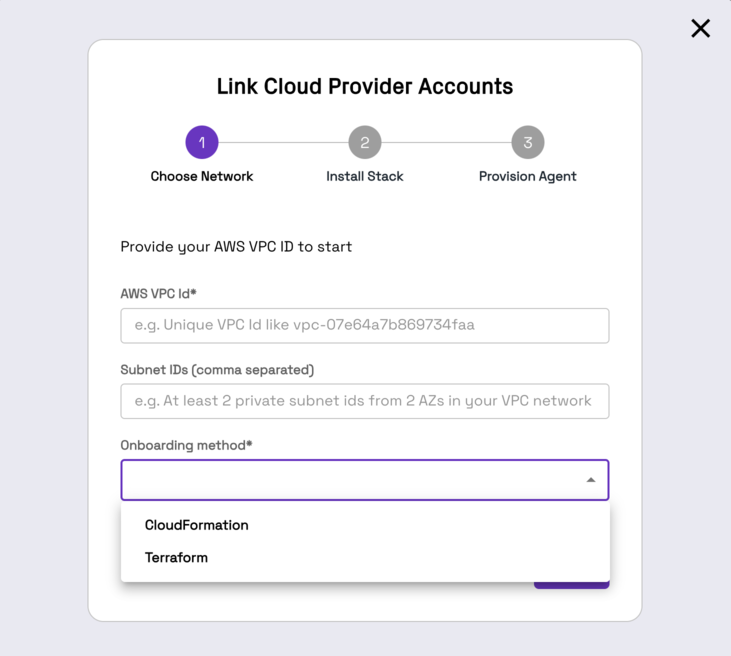
Terraform
Prerequisites
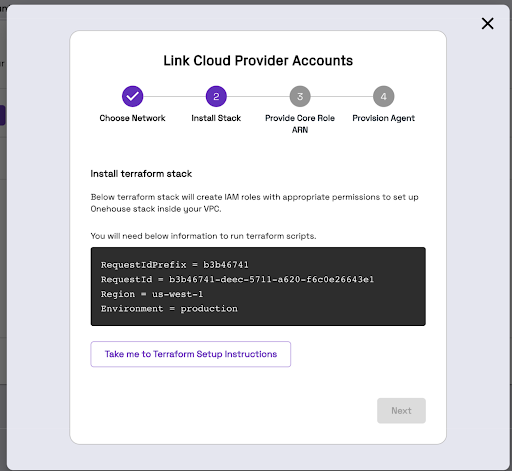
Create an S3 bucket to hold Terraform artifacts before deploying the customer stack: onehouse-customer-bucket-<RequestIdPrefix>. This bucket stores configs and Terraform state. You can find the RequestIdPrefix in the Onehouse UI installation steps.
Install Terraform Stack
You will need administrator-level privileges. The Terraform script generates IAM roles and attaches policies.
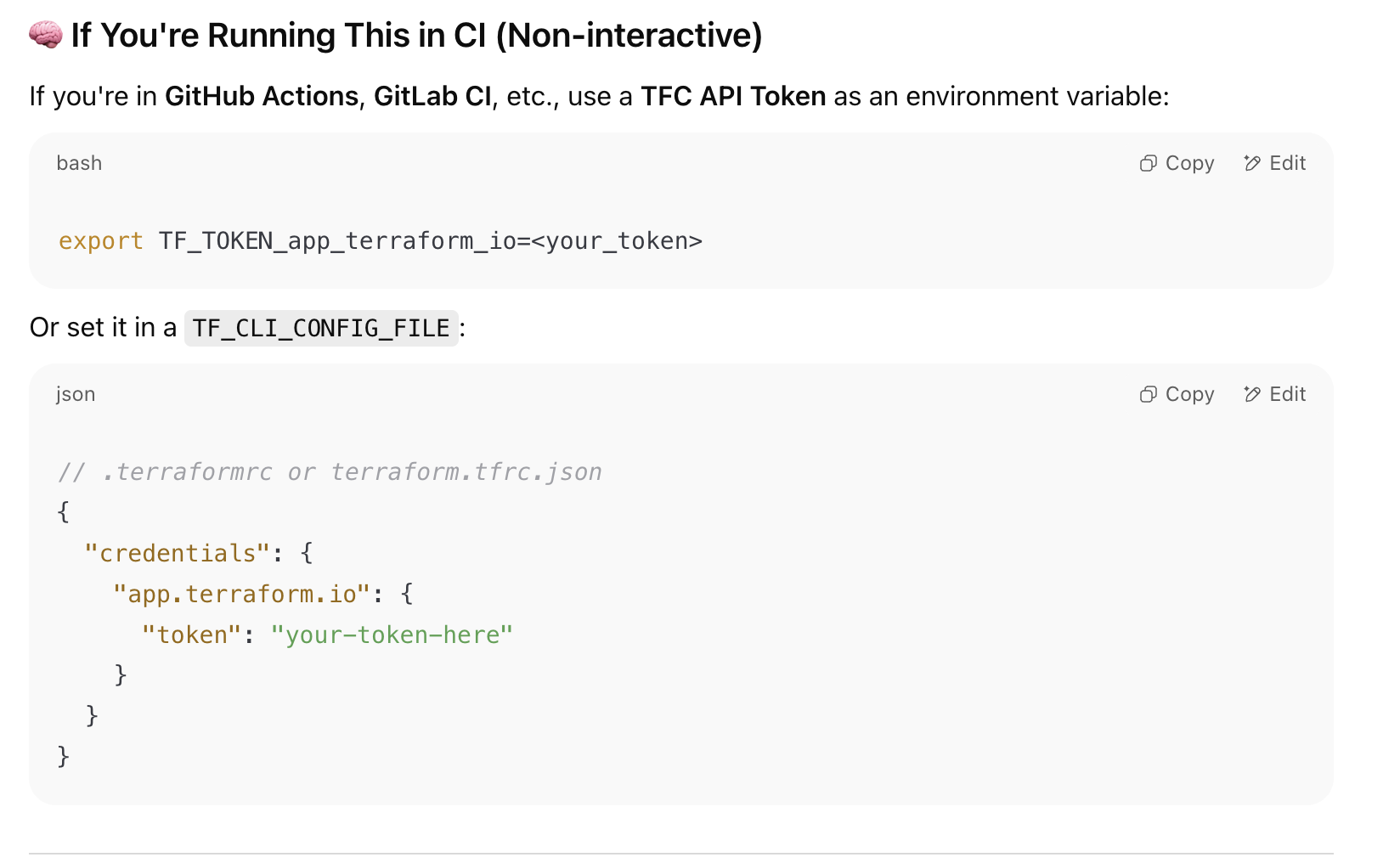
- The Terraform module is hosted on a private registry. Reach out to your Onehouse POC to get a Terraform Cloud token, then authenticate:
- Create a directory with the following structure in a Linux or UNIX environment authenticated to your AWS account:
my-terraform-project/
├── main.tf
├── variables.tf
└── backend.tf
backend.tf
To use a custom S3 bucket for Terraform state instead of onehouse-customer-bucket-<REQUEST_ID_PREFIX>, update the bucket field. region must always be updated.
terraform {
   required_version = "1.11.0"
   required_providers {
     aws = {
       version = "5.82.0"
     }
   }
   backend "s3" {
     bucket = "onehouse-customer-bucket-${REQUEST_ID_PREFIX}"
     key    = "onboarding/terraform/preboarding/onehouse.tfstate"
     region = "${REGION}"
   }
}

provider "aws" {
    region = "${REGION}"
}
main.tf
Update TERRAFORM_MODULE_VERSION:
module "customer-stack" {
    source  = "app.terraform.io/Onehouse/customer-stack/aws"
    version = "${TERRAFORM_MODULE_VERSION}"
    # insert required variables here
}

output "core_role_arn" {
  value = module.customer-stack.core_role_arn
}
The latest stable AWS customer stack version is 1.0.52. See the Changelog below for recent changes.
Terraform Variables
| Variable | Description | Default |
|---|---|---|
| productFlow | Product flow. Values: core, lite | core |
| region | [Required] Region of the EKS cluster | |
| requestId | Onehouse requestId. Provide directly or via requestIdSecretManager. | |
| requestIdSecretManager | Provide requestId via Secrets Manager (enabled + secretArn). | enabled = false |
| environment | [Required] Onehouse environment. Values: production | |
| s3BucketArns | [Required] S3 bucket ARNs for Onehouse access. Example: arn:aws:s3:::<bucket_name> | |
| s3KmsKeys | [Optional] KMS key ARNs for encrypted S3 buckets. | [] |
| s3DataLoad | Enable to load existing data (JSON, CSV, Parquet) from S3. Grants SNS/SQS permissions. | { enabled = false } |
| mskDataLoad | Enable to capture data from Amazon MSK. | { enabled = true } |
| databaseDataLoad | Enable to load from databases (Postgres, MySQL). Requires mskDataLoad enabled. | { enabled = true } |
| glueSync | Enable to sync to AWS Glue. If the Glue Data Catalog lives in another AWS account, set crossAccountRoleArns to the role ARN(s) Onehouse should assume to reach it (grants sts:AssumeRole on exactly those ARNs to the core, support, and node roles). See Cross Account Data Access. | { enabled = true, crossAccountRoleArns = [] } |
| secretsManagerConfig | Permissions for secrets/secrets-manager. Values: OMS (Onehouse managed), BYOS (bring your own secret — recommended). | |
| ascp | Enable mounting Onehouse secrets from AWS Secrets Manager. | { enabled = false } |
| kinesisDataLoad | Enable to load data from Amazon Kinesis Data Streams. If a stream lives in another AWS account, set crossAccountRoleArns to the role ARN(s) Onehouse should assume to read it — Kinesis has no resource-based policy, so cross-account access goes through role assumption. See Cross Account Data Access. | { enabled = false, crossAccountRoleArns = [] } |
| aclSync | Enable ACL settings sync across meta-stores via Onehouse. | { enabled = false } |
| clustersConfig | Cluster settings including Lake Formation authorization. | { enableLakeformationAuthorization = true } |
| lockProviderConfig | DynamoDB table permissions for table locking. | { enableDynamoDB = true } |
| ec2Config | EC2 configuration for bastion host, diagnostic host, and PrivateLink. VPC ID and private subnet ID required. From 1.0.46, each host's CPU architecture is derived from its instanceType, so Graviton types (t4g.*) are supported alongside x86 (t3.*). | |
| integrations | Enable Datadog or GuardDuty integrations. enableTelemetryByos grants the Onehouse core role read access to accessibleTo=onehouse secrets holding bring-your-own telemetry vendor API keys/tokens (Honeycomb, Splunk, Coralogix, ...) that the data-plane forwarders resolve via a byosSecretRef; required when forwarding metrics/logs to such a vendor with a customer-managed secret. | { enableDatadog = false, enableGuardduty = false, enableTelemetryByos = false } |
| karpenterSupport | Enable Karpenter support. | { enabled = true } |
| lbControllerSupport | [Optional] Create the AWS Load Balancer Controller IAM role and policy, plus the ELBv2 permissions the Onehouse core role needs to manage an internal NLB that persists independently of any Kubernetes Service. Enable only when Onehouse asks you to. | { enabled = false } |
| ipv6Support | [Optional] Grant the EKS node role ec2:AssignIpv6Addresses so the VPC CNI can assign IPv6 addresses to pods. Set only for clusters Onehouse provisions with ip_family = ipv6; must match the data-plane cluster's IP family. | { enabled = false } |
| customerRoleArns | [Optional] Customer role ARNs for EKS cluster access. | [] |
| permissions_boundary | [Optional] ARN of IAM policy for permissions boundary. Required if your AWS account enforces boundaries. | "" |
| customTags | [Optional] Custom tags for all resources. Example: { "Team" = "platform" } | |
| protectCoreRoles | [Optional] Available from stack version 1.0.52. Guards the Onehouse core and support roles so any plan that would destroy or replace them fails. Leave at the default true. See Protection on the core and support roles. | true |
| s3SupportBucketArns | S3 bucket paths the Onehouse support team can read. | [] |
| msk_secret_recovery_window_in_days | [Optional] Recovery window applied to the MSK credentials secret when it is deleted. | 30 |
| max_attached_node_policies | [Optional] Maximum number of managed policies the stack may attach to a single IAM role it manages. Mirrors the AWS IAM quota "Managed policies per role" (AWS default 10, raisable to 20 via AWS Service Quotas). Defaults to the AWS maximum of 20 since stack version 1.0.49; lower it to match your account's actual quota if it has not been raised. See Granting access to many S3 buckets. | 20 |
| eksControlPlaneAuditLogs | [Optional] Grant the Onehouse core role permission to enable EKS control-plane logging (including API server audit logs) and manage the cluster's CloudWatch log group lifecycle. From stack version 1.0.52 the stack also creates the execution role for the CloudWatch → S3 audit-log export Lambda, under this stack's permissions_boundary. Enablement is also gated by product configuration. | { enabled = false } |
| customerStackS3Distribution | [Optional] Allow Onehouse CI to publish the customer-stack module archive into your onehouse-customer-bucket-<requestIdPrefix> so you can consume the module via an s3:: Terraform source instead of the Onehouse private registry. Enable only if you use S3-based module distribution. | { enabled = false } |
Creating a bastion host is mandatory for cluster access. Enable bastionHostConfig under ec2Config and provide vpcID and privateSubnetID.
The stack resolves the Amazon Linux 2023 AMI from the architecture of the instanceType you pick, so a Graviton type such as t4g.medium works as-is. Moving an existing host across architectures (for example t3.medium → t4g.medium) replaces the instance.
Granting access to many S3 buckets
AWS caps IAM policy documents at 6,144 characters, which fits roughly 20–30 buckets in a single policy. From stack version 1.0.44, larger s3BucketArns lists are handled automatically: the stack splits the bucket grants across multiple managed policies (typically ~30 buckets per policy for the node role and ~15 for the core and support roles, adapting to your bucket name lengths) and attaches all of them to each role.
Each additional policy consumes one slot of the AWS IAM quota "Managed policies per role" (AWS default 10, maximum 20). Depending on which features are enabled, the stack's roles already carry several other policies, so:
- Up to roughly 50 buckets works with the AWS default quota of 10.
- Beyond that, request an increase of "Managed policies per role" to 20 in AWS Service Quotas (free, account-level, typically auto-approved within minutes).
max_attached_node_policies tells the stack what your account's quota is. Since stack version 1.0.49 it defaults to 20, the AWS maximum, so the stack never rejects an attachment count that AWS would have accepted. If your account is still on the default quota of 10, set it explicitly so the limit is caught at plan time rather than as a LimitExceeded error mid-apply:
max_attached_node_policies = 10
If the bucket list needs more policies than the configured limit on any role, terraform plan fails with an error stating the required count instead of failing mid-apply. With the maximum quota of 20, roughly 200–250 explicitly listed buckets are supported, depending on bucket name lengths. Beyond that, consolidate bucket names under shared prefixes (e.g. arn:aws:s3:::my-project-*) or contact Onehouse support to plan a bucket-policy-based setup.
Enabling lbControllerSupport adds one managed policy to the core role, which counts toward the same limit from stack version 1.0.48.
Protection on the core and support roles
onehouse-customer-core-role-<REQUEST_ID_PREFIX> and onehouse-customer-support-role-<REQUEST_ID_PREFIX> are the roles Onehouse assumes to reach your data plane. If they are deleted or replaced, Onehouse loses access and all ingestion stops — and restoring the roles does not restore access on its own, because a recreated IAM role no longer matches your EKS cluster's access entries.
From stack version 1.0.52 the stack guards both roles, so a terraform plan that would delete or replace either one fails instead of applying. A common trigger is changing requestId, which is part of both role names and therefore replaces the roles.
If a plan fails on one of these roles, contact Onehouse support before working around it. The failure usually means the plan would have taken down ingestion.
For an intentional teardown, set protectCoreRoles = false. This is a create-time decision — it has no effect on a stack that was already created with the guard in place.
Note that the guard only covers deletion and replacement in Terraform plans. Some changes still revoke Onehouse's access without being blocked — notably a change to environment, which rewrites the roles' trust policy in place, and any change made outside Terraform. Review the plan diff on these roles before every apply.
Run Terraform Stack
terraform init --reconfigure
terraform plan
terraform apply
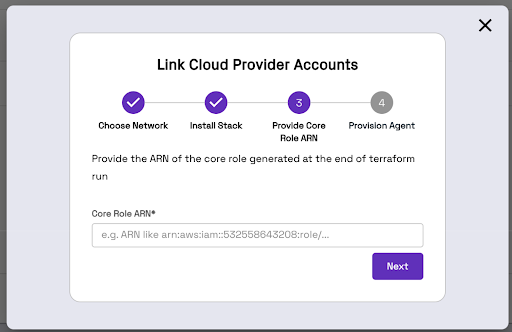
Terraform will generate an IAM Role ARN. Copy and paste this ARN into the Onehouse UI.
Migrating an Existing Terraform Stack to Private Registry Modules
If you already have a Terraform stack with created resources, migrate using the script below. The terraform state mv line is commented out intentionally — run the script first to preview the moves, then uncomment to execute.
#!/usr/bin/env bash
set -euo pipefail

if [ $# -ne 1 ]; then
  echo "Usage: $0 <wrapper_module_name>"
  exit 1
fi

WRAPPER=$1

terraform state list | grep -v '^data\.' | while read -r resource; do
  new_resource="module.${WRAPPER}.${resource}"
  echo "Moving: $resource -> $new_resource"
  #terraform state mv "$resource" "$new_resource"
done
CloudFormation
Install CloudFormation Stack
Click "Take me to AWS CloudFormation" and fill out the Parameters section.
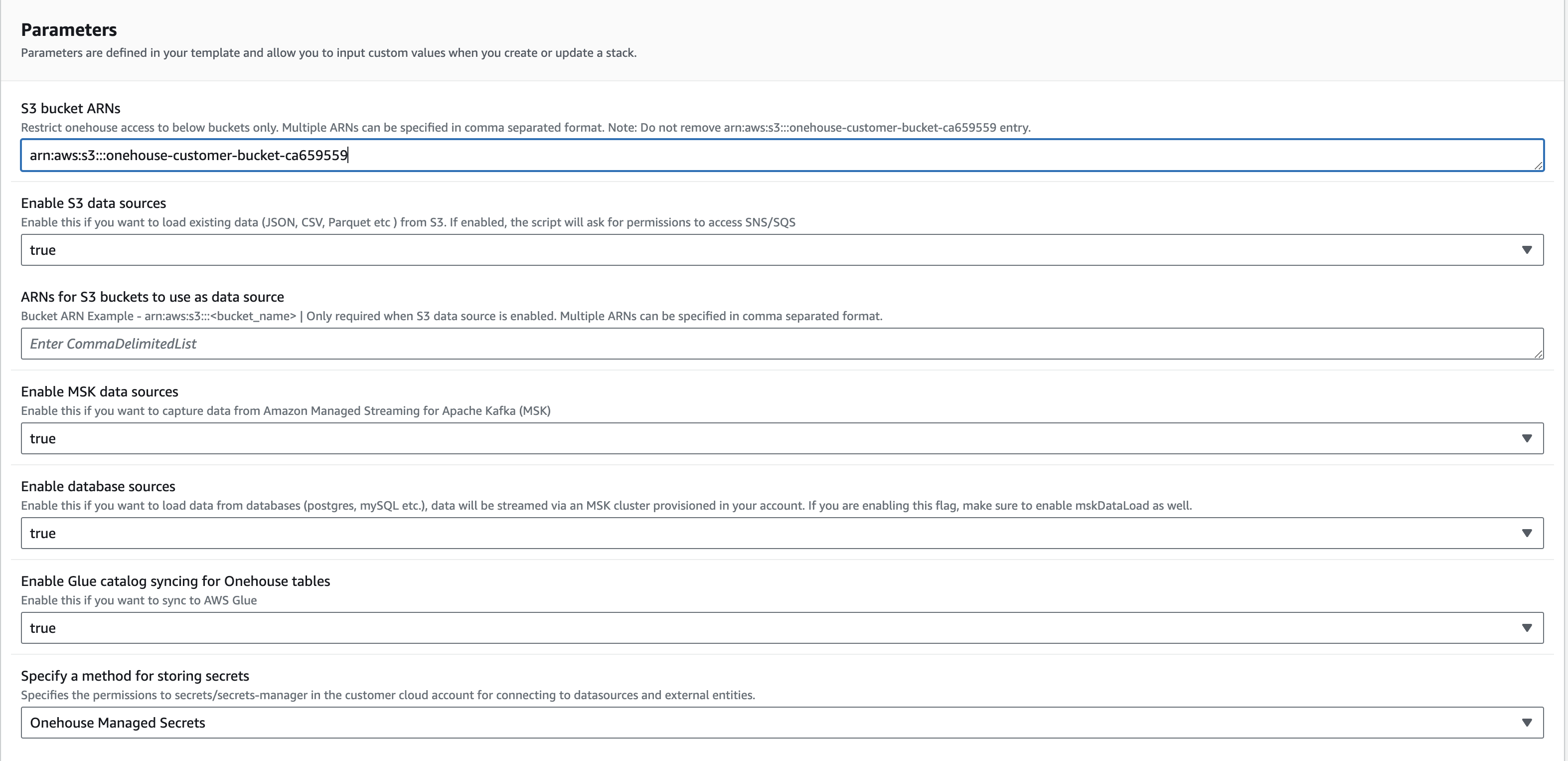
Do not change the name of the CloudFormation stack. Onehouse uses the defined name to monitor the onboarding process.
Click Create Stack. Once the stack is created, return to the Onehouse UI and click Next.
Step 2: Kubernetes Cluster Deployment
The Onehouse dataplane Kubernetes cluster creation starts automatically after the customer stack is deployed. Once finished, the wizard closes and you will see one entry in Connections > Cloud Accounts.
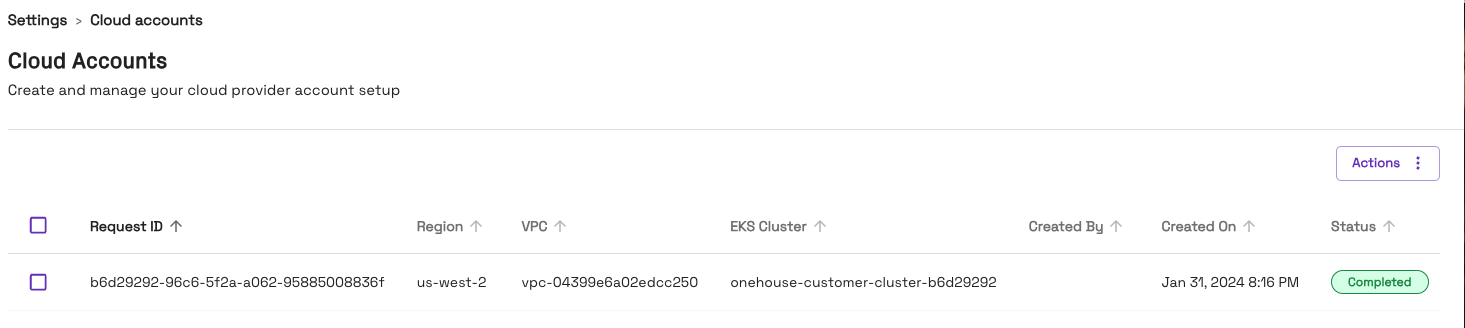
Do not close the page while provisioning is in progress. This step takes approximately 30–40 minutes. If it fails, contact your Onehouse team.
Changelog
Recent AWS customer stack releases. Pin the version in your main.tf to a specific release; bump the version and re-run terraform apply to upgrade.
| Version | Highlights |
|---|---|
1.0.52 (current) | Added safeguards that stop the IAM roles Onehouse relies on from being removed or replaced by accident, plus the protectCoreRoles variable to opt out at create time (details). Minor permission refinements for optional features. |
1.0.50 | Fixes for the Load Balancer Controller. Only affects stacks with lbControllerSupport enabled. |
1.0.48 - 1.0.49 | Granted the Onehouse core role the ELBv2 permissions it needs to manage the lbController and relaxed some validations w.r.t policies per role. |
1.0.47 | Bug fixes and minor improvements. |
1.0.46 | Added glueSync.crossAccountRoleArns for cross-account Glue Data Catalog access, and kinesisDataLoad.crossAccountRoleArns for cross-account Kinesis streams — both via role assumption (details). The node role can now decrypt CMK-encrypted BYOS secrets, and the support role can decrypt buckets encrypted with keys listed in s3KmsKeys. Bastion and diagnostic hosts support Graviton (t4g.*) instance types. Removed additional_node_role_policy_arns and additional_node_role_inline_policies, superseded by the cross-account role-assumption path above. |
1.0.45 | Added ipv6Support for data-plane clusters provisioned with ip_family = ipv6. |
1.0.44 | Removed the ~30-bucket limit on s3BucketArns by splitting bucket grants across multiple managed policies. Added max_attached_node_policies (details). |