AWS BYOK prerequisites
This page lists the requirements for an Amazon EKS cluster that you use with a Bring Your Own Kubernetes (BYOK) project. The Onehouse console checks most of these requirements in step 4 of the onboarding wizard and reports any that are not met.
Create the cluster
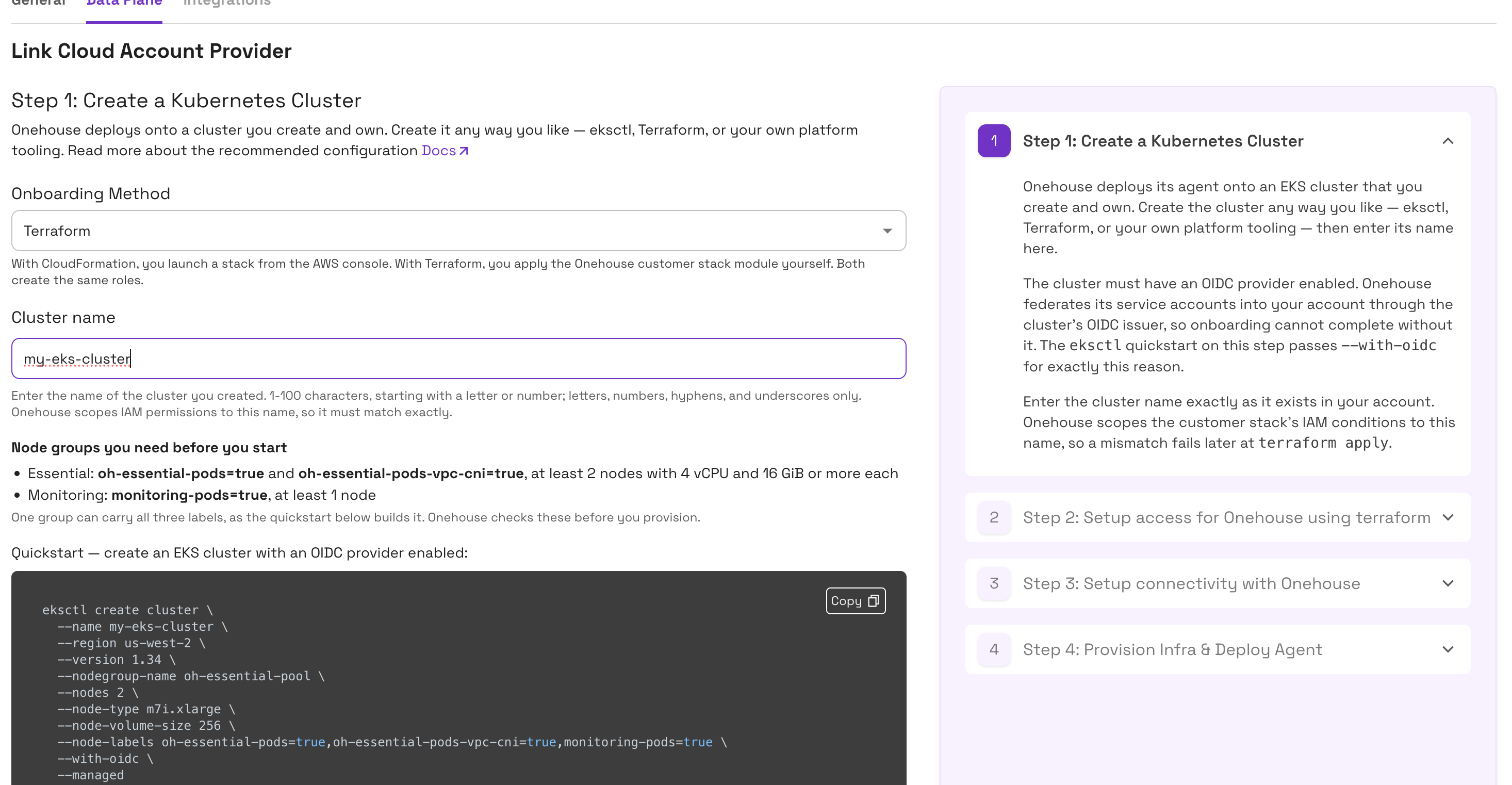
Step 1 of the onboarding wizard shows an eksctl command that creates a cluster with the required seed node group and IAM OIDC provider. Use that command, or create the cluster with other tools, such as Terraform or AWS CloudFormation. If you use other tools, make sure that the cluster meets each requirement on this page.
Cluster
Authentication mode
The cluster authentication mode must be API or API_AND_CONFIG_MAP. Onehouse gets access to the cluster through EKS access entries, which the CONFIG_MAP mode does not support.
The EKS CreateCluster API, the AWS CLI, the AWS SDKs, and AWS::EKS::Cluster without an AccessConfig property use CONFIG_MAP by default. The AWS Management Console, current versions of eksctl, and version 20 and later of the terraform-aws-modules/eks module use an access-entry mode by default.
To check the authentication mode:
aws eks describe-cluster --name <cluster-name> --query cluster.accessConfig.authenticationMode --output text
If the output is CONFIG_MAP, change the mode:
aws eks update-cluster-config --name <cluster-name> --access-config authenticationMode=API_AND_CONFIG_MAP
API_AND_CONFIG_MAP keeps the existing entries in the aws-auth ConfigMap.
If the mode is CONFIG_MAP, the customer stack apply fails with an error that names the mode.
Cluster name
Step 1 of the wizard shows the rules for the cluster name. Enter the name exactly as it is in your account. The customer stack scopes its IAM permissions to this name. If the names do not match, terraform apply fails.
Seed node groups
The Onehouse autoscaler cannot provision the nodes that it runs on, so the cluster must have seed nodes before onboarding. Step 1 of the wizard lists the labels, the number of nodes and the node size for the seed node groups. The autoscaler does not manage nodes that have these labels.
Seed node IAM role
Onehouse pods on the seed nodes pull images from the Onehouse registry through a cross-account pull-through cache. This requires permissions on both sides.
-
Get the IAM role of the seed node group. For a node group that
eksctlcreated, step 1 of the wizard shows the command. -
Add this policy to the role:
{
  "Version": "2012-10-17",
  "Statement": [
    {
      "Sid": "PullFromOnehouseRegistry",
      "Effect": "Allow",
      "Action": [
        "ecr:BatchGetImage",
        "ecr:BatchImportUpstreamImage",
        "ecr:GetDownloadUrlForLayer"
      ],
      "Resource": "arn:aws:ecr:*:194159489498:repository/*"
    }
  ]
}
The
AmazonEC2ContainerRegistryReadOnlymanaged policy does not includeecr:BatchImportUpstreamImage. Without this action, images that are already in the cache pull successfully, but a cache miss fails with HTTP403. -
Specify the role ARN in
customerNodeRoleArnswhen you deploy the customer stack. Onehouse adds the role to the repository policies of the cache. If the seed nodes are in more than one node group, specify the ARN of each role.
Both the role policy and the customerNodeRoleArns entry are required.
Cluster components
Karpenter
The cluster must not run Karpenter. Onehouse installs and manages its own Karpenter, including the node bootstrap that Spark local storage uses. Two Karpenter installations conflict over the same nodes. Remove an existing installation before onboarding.
Components that Onehouse can reuse
If the cluster already runs one of these components, Onehouse uses it and does not install a second copy:
| Component | Requirement |
|---|---|
| AWS Load Balancer Controller | Runs in kube-system with TargetGroupBinding support (the default) |
| cert-manager | Runs cluster-wide (not started with --namespace). Onehouse uses a ClusterIssuer. |
Step 4 of the wizard shows the components that Onehouse found. You can change the default for each component there.
Required add-ons
The cluster must run vpc-cni, kube-proxy and coredns. You manage these add-ons. Onehouse does not install or change them, and provisioning fails if one is missing.
Amazon EBS CSI driver
Onehouse installs and upgrades the EBS CSI driver. An existing EBS CSI driver blocks onboarding, because both installations use the same service account, the same CSIDriver object and the same identity binding.
To remove the existing driver:
aws eks delete-addon --cluster-name <cluster-name> --addon-name aws-ebs-csi-driver
# If you installed the driver with Helm:
helm uninstall aws-ebs-csi-driver -n kube-system
While no EBS CSI driver is installed, EBS volumes cannot be attached or detached. Running pods keep their volumes. A pod that restarts or moves to a different node cannot attach its volume until Onehouse installs the driver during provisioning. Remove the driver when no stateful workload needs to reschedule.
Existing EBS volumes are not deleted.
IAM OIDC provider
The cluster must have an IAM OIDC provider for its OIDC issuer. By default, the customer stack creates it.
If the provider already exists, set createOidcProvider = false in the customer stack. Otherwise, the apply fails with EntityAlreadyExists. The --with-oidc option of eksctl creates the provider.
Cluster DNS for private sources
If a data source resolves only in your network, such as an internal database or an on-premises resolver, add a stub domain or forward block to the coredns configuration of the cluster.
On a managed data plane, Onehouse can manage this configuration. On BYOK, Onehouse does not change the coredns configuration, so your changes stay in place after each Onehouse deployment.
This step is not necessary if all data sources resolve publicly.
EC2 and EBS service quotas
Onehouse launches instances in your account, within your service quotas. Increase the quotas before onboarding if they are at the AWS defaults.
| Quota | Code | Notes |
|---|---|---|
| Running On-Demand Standard (A, C, D, H, I, M, R, T, Z) instances | L-1216C47A | Measured in vCPUs. Includes t4g, m7i, i8g, r8gd and t3a. |
| All Standard Spot Instance Requests | L-34B43A08 | Measured in vCPUs. Applies if node groups use Spot Instances. |
Storage for General Purpose SSD (gp3) volumes | Varies | Applies to each volume that the data plane provisions |
To check a quota:
aws service-quotas get-service-quota \
  --service-code ec2 --quota-code L-1216C47A --region <region>
The seed nodes use at least 8 vCPUs: 2 nodes with 4 vCPUs each. With a separate monitoring node group, they use 12 vCPUs. Nodes that the autoscaler adds use the same quota.
If a quota is reached, pods stay in Pending and no new nodes start.
Outbound network access
Onehouse components in the cluster connect to Onehouse endpoints. If outbound traffic is restricted, allow the hosts in Verify egress before onboarding. Step 4 of the wizard checks these hosts.
Checks in the wizard
Step 4 of the wizard checks the seed node groups, the cluster components and outbound network access. It does not check service quotas, cluster DNS, the IAM OIDC provider or the authentication mode. Problems with these items appear when you apply the customer stack or when the account reaches a quota.
For the full onboarding procedure, see Overview.